 310-553-3055
 213-463-2100
Imagine a new employee starts Monday morning.
You give them access to company information.
You explain a few things about the business.
Then you tell them:
"Just help everyone with whatever they need."
No defined role.
No clear responsibilities.
No explanation of which information they should use.
No guidance about what they shouldn't do.
You probably wouldn't expect that employee to be particularly effective.
Yet as businesses begin experimenting with Microsoft Copilot agents, I think there's a risk of approaching AI in a similar way.
The conversation quickly becomes:
"What kind of agent can we build?"
I'd start somewhere else.
What job do we actually need it to do?
Because the most useful Copilot agent may not be the one that can do the most.
It may be the one that has a very specific job and does it well.
Start With a Problem, Not an Agent
It's easy to get excited about what's possible with AI.
But "we should build an AI agent" isn't really a business objective.
Maybe your HR team answers the same employee questions every week.
Maybe salespeople spend too much time searching for product information.
Maybe new employees struggle to find policies and procedures.
Maybe customer service employees repeatedly search through documentation before responding to common questions.
Those are problems.
And they're much better places to start.
Instead of asking:
"Where can we use an AI agent?"
Ask:
"What repetitive work or information problem would we like to make easier?"
That changes the conversation.
Now you're not looking for somewhere to put AI.
You're looking for a business problem AI might actually help solve.
Give the Agent a Job Description
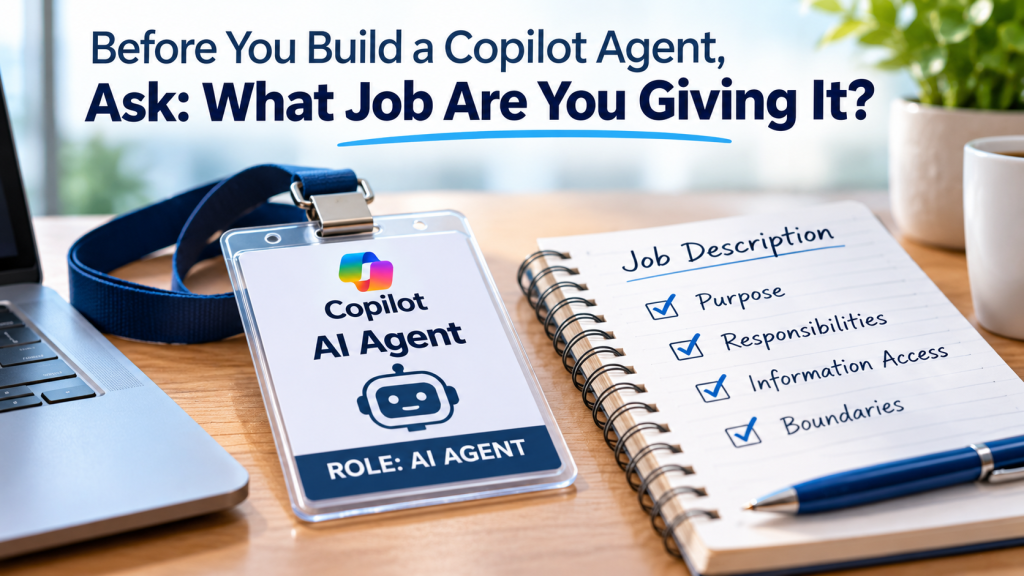
Once you've identified the problem, I'd treat the agent almost like you're defining a new role.
What is its job?
Who will use it?
What questions should it answer?
What information does it need?
What should it not answer?
When should it tell someone it doesn't know?
When should a human take over?
For example, imagine you're creating an internal HR agent.
Its job might be to help employees find answers about PTO, benefits and company policies.
That's much clearer than:
"Answer employee HR questions."
The difference matters.
A narrowly defined role makes it easier to determine what information the agent needs, what instructions it should follow and where its boundaries should be.
Microsoft's Agent Builder allows organizations to give agents specific instructions and connect them to selected knowledge sources such as SharePoint, OneDrive and other business content.
That makes defining the agent's role especially important.
The question shouldn't simply be what information you can connect.
It should be what information the agent actually needs to perform its job.
Don't Give It the Entire Filing Cabinet
Once businesses realize a Copilot agent can use company information, there's a temptation to connect as much information as possible.
More information must make the agent more useful, right?
Not necessarily.
If you're building an agent to answer HR policy questions, does it need access to every SharePoint site in the company?
Probably not.
It needs the information required to perform its job.
And ideally, that information should be current, organized and trustworthy.
If you give an agent outdated policies, duplicate documents and information nobody has maintained in years, you shouldn't be surprised when its answers become less useful.
AI doesn't automatically fix messy information.
Sometimes it simply makes the mess easier to find.
There's an important security consideration here too.
Microsoft Copilot can respect existing SharePoint permissions, meaning users should only receive information they already have permission to access.
But that makes good permission management even more important.
Before connecting company information to an agent, businesses should understand who already has access to that information and whether those permissions still make sense.
Decide What the Agent Is Allowed to Do
There's another important distinction businesses need to understand.
An agent that finds information isn't necessarily the same as an agent that takes action.
Maybe an agent answers a question.
Maybe it summarizes a document.
Maybe it drafts a response.
But agents can also be designed to interact with tools, data and workflows.
That means the conversation eventually moves from:
"What can this agent know?"
to:
"What can this agent do?"
That's where businesses need to be deliberate.
If an agent can take an action, what requires human approval?
What systems can it interact with?
What information can it use?
What happens when it's unsure?
The more authority you give an agent, the more important those questions become.
Test the Weird Questions, Not Just the Easy Ones
When someone builds an agent, they naturally test whether it can do what it was designed to do.
That's important.
But I'd also test what happens when things don't go according to plan.
Ask it something outside its role.
Give it an ambiguous request.
Ask for information it shouldn't provide.
Use an outdated document.
See what happens when two sources appear to contradict each other.
Try the kinds of questions employees will eventually ask once nobody from the project team is standing over their shoulder.
Microsoft provides tools for testing agents before broader deployment, but the technical test is only part of the process.
Real employees should be part of the pilot too.
A successful demo tells you the agent can work. A good pilot helps you understand how it behaves when real people start using it.
Those are different tests.
Someone Still Has to Own It
Building the agent isn't the end of the project.
Company information changes.
Policies change.
Processes change.
Employees discover new ways to use technology.
And sometimes the reason an agent was originally created changes too.
Someone needs to be responsible for asking:
Is the information still current?
Are the instructions still appropriate?
Are people actually using it?
Is it giving useful answers?
Has its access changed?
Does the business still need it?
Without ownership, today's useful AI agent can eventually become tomorrow's forgotten technology.
And we've already seen what happens when businesses accumulate technology nobody is really responsible for.
AI shouldn't become another version of that problem.
The Best Copilot Agent May Be the Boring One
I think there's a tendency with AI to look for the biggest idea.
The agent that transforms an entire department.
The technology that changes everything.
Maybe those opportunities exist.
But I wouldn't necessarily start there.
I'd start with something smaller.
Find a repetitive problem.
Give the agent a specific job.
Give it the information required to do that job.
Set boundaries around what it can access and do.
Test it with real employees.
Then see whether it actually makes their work better.
If it does, build from there.
Because the goal shouldn't be to see how many Copilot agents your business can create.
The goal should be to create one that solves a problem worth solving.
Frequently Asked Questions
What is a Microsoft Copilot agent?
A Microsoft Copilot agent is an AI-powered assistant that can be configured for a specific business purpose. Depending on how it is designed, an agent can use selected company information to answer questions, help employees find information, support business processes or interact with other tools and systems.
What should a business do before building a Copilot agent?
Start by identifying a specific business problem. Define who will use the agent, what it should accomplish, what information it needs and what should remain outside its scope. A focused use case is usually a better starting point than trying to build an agent that does everything.
What information can a Copilot agent use?
Depending on how the agent is built and configured, Microsoft supports knowledge sources including SharePoint, OneDrive, uploaded documents, websites and other connected business systems. The appropriate sources should be chosen based on the agent's specific purpose.
Can a Copilot agent access information employees shouldn't see?
When SharePoint is used as a knowledge source, Microsoft says Copilot respects the signed-in user's existing permissions and sensitivity privileges. However, businesses should still review permissions before deployment because employees may already have access to information they no longer need or shouldn't have.
Should a Copilot agent be tested before employees use it?
Yes. Testing should include more than confirming that the agent answers expected questions correctly. Businesses should also test ambiguous requests, questions outside the agent's intended role, conflicting information and other unexpected scenarios. A limited pilot with real employees can help uncover issues before a wider rollout.
Who should be responsible for a Copilot agent after it is launched?
Every agent should have a clear owner. Someone should be responsible for reviewing its instructions, knowledge sources, access, usefulness and performance as company information and business processes change.
Build the Agent Around the Business Problem
Microsoft is making it increasingly accessible for businesses to create their own Copilot agents.
But being able to build an agent and knowing which agent your business should build are two different things.
The technology is only part of the decision.
The business also needs to think about the problem it's trying to solve, the information the agent will use, the access it should have, how employees will use it and who will be responsible for it over time.
If your organization is exploring Microsoft Copilot and isn't sure where agents fit, Netready IT can help you evaluate practical use cases, prepare your Microsoft 365 environment, and develop an approach to Copilot adoption and AI governance that fits your business.
Because before you give an AI agent access to your business, there's one question worth answering clearly:
What job are you giving it?
Zac Abdulkadir, CISSP, CISA, CISM, CRISC
President, Netready IT